New: Sahkarmi is on the Microsoft Store, free New: give your team work from Telegram New: Skills, MCP servers and workflow export New: how much time and money can AI save you?

Free · Open source · Version 0.16.0

Hire an AI team. Pay ₹0.

They chase your invoices.answer your customers.write your posts.research your market.fix your code.work while you sleep.

Sahkarmi puts AI coworkers on your Windows PC. They browse, write, research, work inside 1,660 apps and run on a schedule. Before they pay, send or post, they ask you.

Download from the Microsoft Store

FREE · ₹0Now on the Microsoft Store

  • Signed and certified by Microsoft
  • One-click install, no SmartScreen warning
  • Updates automatically

Free forever. No account, no card. Windows 10 and 11. · Source code

  • Runs on your PC
  • Asks before it pays or sends
  • Open source, Apache 2.0
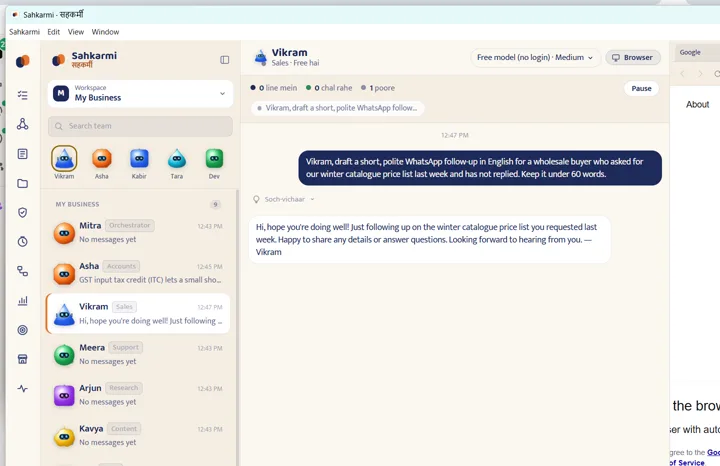
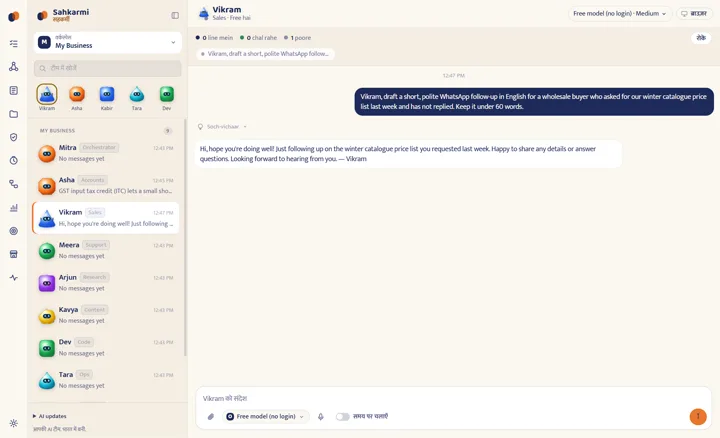
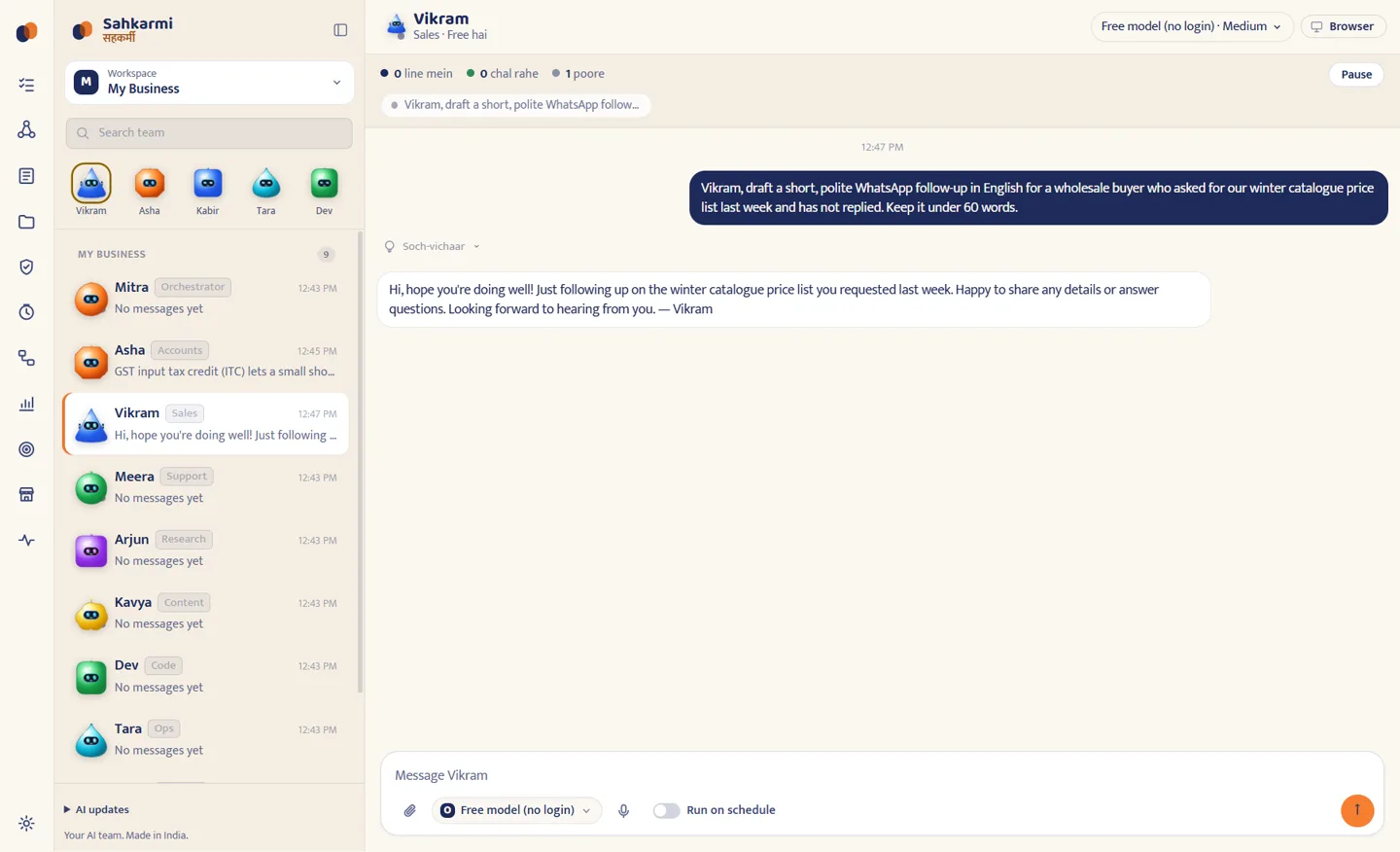
Sahkarmi 0.7.1 on Windows: the coworker list on the left and Vikram, the sales coworker, answering a request for a WhatsApp follow-up on the free built-in model

1,660 apps

Plugs into the apps you already use

Gmail, Sheets, Slack, Notion, GitHub, HubSpot and 1,600+ more through Composio's free plan. Connect once, and every coworker can use them. Anything that sends, changes or deletes waits for your OK.

  • GmailGmail
  • Google SheetsGoogle Sheets
  • SlackSlack
  • NotionNotion
  • GitHubGitHub
  • HubSpotHubSpot
  • Google CalendarGoogle Calendar
  • WhatsAppWhatsApp
  • ShopifyShopify
  • Google DriveGoogle Drive
  • InstagramInstagram
  • LinkedInLinkedIn
  • YouTubeYouTube
  • TrelloTrello
  • OutlookOutlook
  • AirtableAirtable
  • SalesforceSalesforce
  • ZoomZoom
  • JiraJira
  • AsanaAsana
  • DiscordDiscord
  • ExcelExcel
  • Google DocsGoogle Docs
  • Microsoft TeamsMicrosoft Teams
  • ClickUpClickUp
  • monday.commonday.com
  • LinearLinear
  • PipedrivePipedrive
  • RedditReddit

New in Sahkarmi

Everything a real team does. Built in.

  • 175

    A marketplace of 175 coworkers

    Accountant, HR manager, shop manager, tutor, designer, developer and many more. Add one in a click, each with its own steps, checks and results.

  • 1,660 apps, one free key

    Gmail, Google Sheets, Slack, Notion and more through Composio's free Hobby plan: 1,00,000 tool calls a month, no card.

  • 15 AIs. Pick one per coworker.

    Free built-in models, or your own ChatGPT, Claude, Gemini, GitHub Copilot, Cursor, Qwen, Kimi, Grok and more. No tokens copied, ever.

    • OpenCode
    • ChatGPT
    • Claude
    • Gemini
    • GitHub Copilot
    • Cursor
    • Qwen Code
    • Kimi Code
    • Cline
    • Grok
    • Mistral Vibe
    • Kiro
    • Goose
    • Factory Droid
    • Qoder
  • Free limit used up? It switches.

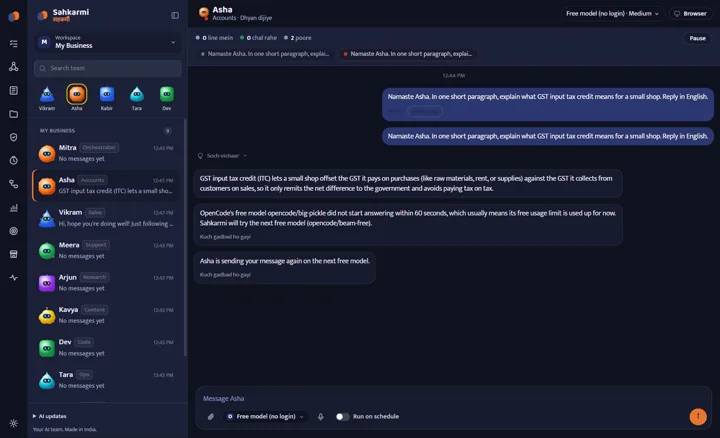
    When the free model hits its limit, the coworker moves to the next free AI you have connected and carries on.

  • Its own browser

    Every coworker browses in its own tab. Press Take over for logins and OTPs.

  • Routines on autopilot

    Hourly, daily or weekly. Build a routine once and it runs on its own.

  • You approve the big moves

    Payments, customer messages, posts and forms wait in your Approvals inbox.

  • Speaks your language

    English, हिन्दी and বাংলা. INR with lakh and crore, GST and IST built in.

New: Telegram

Your AI team, now in your pocket

Send a message on Telegram from your phone. Your coworker on your PC does the work and replies in the same chat. Set it up once, in about 2 minutes.

  1. Make your bot

    In Telegram, open @BotFather and send /newbot. Pick any name. It gives you a long code called a token.

  2. Paste it in Sahkarmi

    Open Settings > Telegram and paste the token. Not sure? Press Show me how and follow the picture for each step.

  3. Pair and start chatting

    Press Pair in Telegram, then Start. From now on, only your chat gets answers. Send work from anywhere.

  • Only your chat is answered
  • /coworkers shows your team, /use switches
  • Approvals reach your phone
  • Free: Telegram and the bot cost ₹0

Keep Sahkarmi open on your PC. Payments and messages to customers still wait for your OK in the app.

New: Skills · MCP · Export

Plug in any tool. Take your workflow anywhere.

Give your coworkers the same skills and MCP tools Claude Code uses, straight from open-source GitHub repos. Then save what they did as a clean file you can share or run again.

MCP servers

New tools in one paste

Copy the MCP JSON from any README, Claude Desktop or a .mcp.json file, and paste it in Settings > MCP servers. Or load a repo's .mcp.json from its GitHub link.

  • Works with Claude, Codex, Gemini and more
  • Keys stay on your PC, never shown again
  • npx servers just work on Windows
  • Every tool still asks your approval
  1. 1Paste or load the JSON
  2. 2Restart Sahkarmi
  3. 3Coworkers use the new tools

Skills

Skills from any GitHub repo

Paste a repo link, see every SKILL.md inside, and install the ones you pick. Design, documents, research, reverse engineering: every coworker reads the right skill before the task.

Workflow export

Save the work. Share it. Run it again.

Export a chat, a team run or a routine as Markdown, plain text or JSON: the task, every step with timing and the result. Import the JSON and it becomes a routine for your own coworkers.

Gets better every week

A team that learns how you work

Most AI tools forget you when the chat ends. Sahkarmi coworkers keep what they learn, on your own PC, and get faster at your work.

  • Learns new skills by itself

    After a long task, a fix or a correction from you, the coworker writes the steps down as a skill. Next time it follows them, and improves them.

  • Remembers what was decided

    Coworkers search earlier chats, their own or the whole team's, to recall what was sent or promised, instead of guessing.

  • Works while you sleep

    Routines run hourly, daily or weekly on their own. The results are waiting for you in the morning.

  • Reach it from anywhere

    Telegram on your phone talks to the same team, with the same memory, as the app on your PC.

  • Your PC, your data

    Skills, memory and chats are plain files on your computer. Open, edit or delete any of them. Skills never keep passwords, OTPs or card numbers.

  • Always the newest AI

    Sahkarmi keeps its own copy of OpenCode, Claude Code and Codex up to date, and switches to the new one when your coworkers are free.

See it working

See your AI team at work

The real app on a Windows PC, start to finish.

Narration:

Recorded on a clean Windows PC with the free built-in model. Captions in Hindi and English.

What Sahkarmi is

Not another chat window. A team that gets work done, with you in charge.

Sahkarmi (सहकर्मी, “coworker”) gives you named coworkers, each with a role, a folder, a memory and a queue of tasks. You give them work in plain language. They read files, browse the web in their own tab, hand work to each other, and stop to ask you before anything that spends money or talks to a customer.

  • Who it is for

    People who already pay for an AI

    If you use Claude Code, Codex (ChatGPT) or Google Antigravity, Sahkarmi reuses that sign-in and gives it a workspace, a browser, schedules and approvals.

  • Who it is for

    Small businesses and solo operators

    The default team covers accounts, sales, support, research, content, code, operations and security. Rename them, give them your own instructions, add more.

  • Who it is for

    Anyone who wants AI without a cloud account

    The app works on first launch with free models and no login. Your chats and files never leave your PC except to the AI provider you choose.

How it differs

What you get here that a chat app or a cloud agent does not

Chat apps talk. Sahkarmi gets the work done.

WhatChat appsCloud agentsSahkarmi
Where it runsProvider's serversVendor's cloudYour own computer; data stays local
Account neededYesYes, usually paidNo account for the free models; your own sign-ins are optional
Acts on your behalfRarelyYes, in the cloudYes, with files, commands and a built-in browser on your PC
Human controlYou copy and pasteVariesApprovals inbox, Take over browser, pause and stop any task
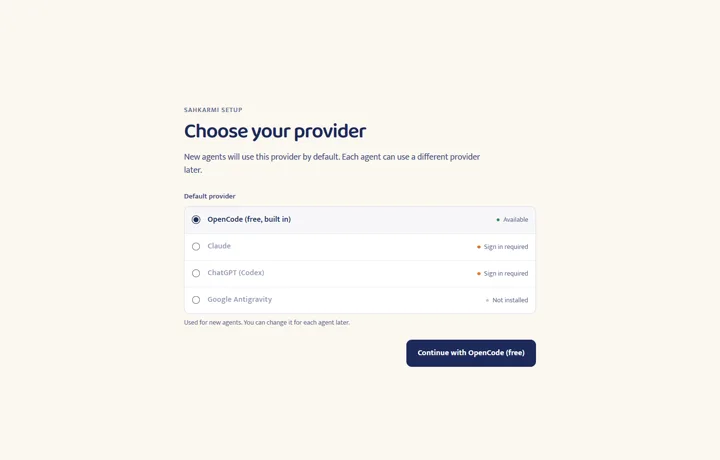
Several AIs at onceOne vendorOne vendorFree models, Claude, ChatGPT and Google Antigravity side by side, per coworker
Open sourceRarelyRarelyApache License 2.0, built in public on GitHub
Indian languagesReplies onlyReplies onlyInterface in English, Hindi and Bengali; INR, GST and IST conventions built in

How it works

Ask. They work. You approve.

  1. Pick a coworker and give a task

    Message Asha, Vikram or any coworker in English, Hindi or Bengali. Attach files, or switch on Run on schedule for hourly, daily or weekly work.

  2. They work where you can see it

    Every step shows in the thread: files read, commands run, pages opened in the coworker's own browser tab. Pause, cancel or stop at any time.

  3. You decide the risky bits

    Before a payment, a customer message, a post or a form, the coworker files a request in Approvals and waits. For logins and OTPs you press Take over and type them yourself.

Features

Everything you get. Free.

Every feature here is in the app you download today.

  • Nine coworkers to start

    Mitra (orchestrator), Asha (accounts), Vikram (sales), Meera (support), Arjun (research), Kavya (content), Dev (code), Tara (ops) and Kabir (security). Rename, edit or delete any of them, with an 8-second undo.

  • A browser per coworker

    A built-in Chromium tab with a Take over button. While you are in control, the coworker's browser tools pause; hand back when you are done.

  • Approvals inbox

    Approve or reject with a note. Your decision goes back to the coworker as a message, so nothing is blocked while you are away.

  • Task queue, schedules and routines

    See what is queued, running and done. Run a task once, hourly, daily, on weekdays or weekly, and keep routines you reuse.

  • Shared files and memory

    One Shared folder the whole team can read and write, each coworker's own folder, and a memory page you can inspect.

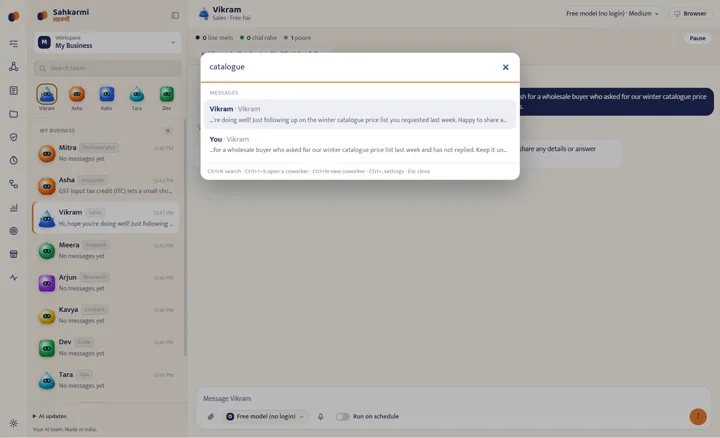
  • Search everything

    Ctrl+K finds coworkers and any message in the workspace and jumps straight to it. Ctrl+1 to 9 open coworkers, Ctrl+N makes one.

  • Free AI built in, your sign-ins reused

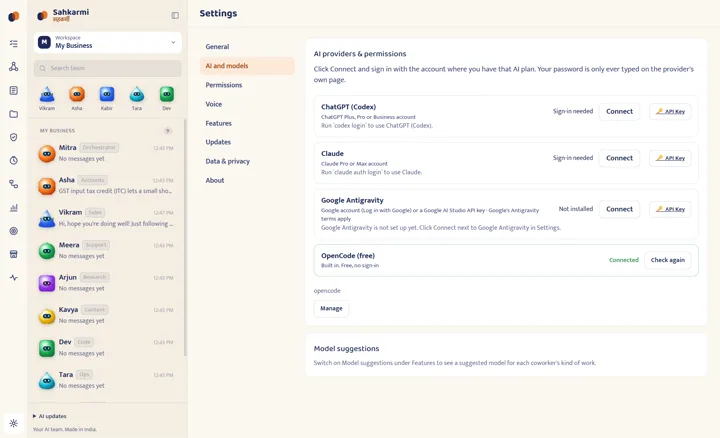
    The bundled OpenCode runtime brings free models with no login. Claude Code, Codex (ChatGPT) and Google Antigravity connect with your existing accounts; tokens are never copied.

  • Backup model

    If a paid provider answers nothing or hits its quota, the coworker moves to the free model, tells you why, and sends your message again.

  • Your language, your size

    Interface in English, Hindi and Bengali, with nine more Indian languages partly translated. Light and dark themes, three interface sizes, Enter or Ctrl+Enter to send.

The default team

Nine roles on day one. Make them yours.

Each coworker starts with standing instructions for Indian business context: INR with lakh and crore, IST, GST, DD/MM/YYYY dates, and replies in the language you write in.

  • M

    Mitra

    Orchestrator: splits big jobs across the team and reports back.

  • A

    Asha

    Accounts: invoices, payables, reconciliation and GST paperwork.

  • V

    Vikram

    Sales: leads, follow-ups, quotes and price lists.

  • M

    Meera

    Support: draft replies to customer questions and complaints.

  • A

    Arjun

    Research: suppliers, competitors, prices and rules, with sources.

  • K

    Kavya

    Content: posts, product descriptions and catalogues.

  • D

    Dev

    Code: scripts, spreadsheets, small tools and fixes.

  • T

    Tara

    Ops: checklists, scheduling and day-to-day coordination.

  • K

    Kabir

    Security: reviews risky requests and keeps an eye on permissions.

AI providers

15 AIs. Free ones built in. Yours when you want.

Sahkarmi finds the AI tools installed on your computer and reuses their existing login. It never copies your tokens, and your password is only ever typed on the provider's own page.

ProviderHow Sahkarmi uses itCost
OpenCode (built in)Bundled in the installer. Free models, no login. OpenCode sets usage limits on its free models; when one is used up, the app tells you and you can connect another provider or try later.Free
ClaudeYour installed Claude Code and its login.Your Claude plan
ChatGPT (Codex)Your installed Codex CLI and its ChatGPT login.Your ChatGPT plan
Google AntigravityGoogle's own Antigravity agent, downloaded by Sahkarmi when you click Connect (Google's terms apply). One click opens Log in with Google; a Google AI Studio API key also works.Your Google plan
11 more AI agentsGitHub Copilot, Cursor, Qwen Code, Kimi Code, Cline, Grok, Mistral Vibe, Kiro, Goose, Factory Droid and Qoder. Sahkarmi installs each one for you when you press Connect.Your plan; Copilot and Kiro have free tiers

Paid plans are billed by those providers, not by Sahkarmi. Sahkarmi has no pricing, no account and no subscription.

Download

Download for Windows

Every file is built by GitHub Actions from the public source, with SHA-256 checksums and a provenance attestation on the release page. Current version: 0.16.0

Recommended

Microsoft Store

Windows 10 · 11 · verified by Microsoft
Signed and certified by Microsoft

₹0free forever, no in-app purchases

One-click install with no SmartScreen warning, and the Store keeps Sahkarmi up to date for you.

Download from the Microsoft Store
winget install --id 9PD6BP3NGVST --source msstore
Open straight in the Microsoft Store app

Windows

10 · 11 · 64-bit
Built and tested by the project

Windows 10 or 11, 64-bit. SmartScreen will warn because the installer is not code-signed yet: choose More info, then Run anyway. (232 MB)

Download .exe Windows install and first-launch steps

Windows installer

Privacy, security and permissions

Your PC. Your data. Your rules.

  • No account, no analytics

    Coworkers, chats, files, usage history and the activity log are stored on your computer under your user profile. Sahkarmi has no cloud service and sends no analytics; the only outbound traffic of its own is the update check against GitHub Releases.

  • What goes to an AI provider

    When a coworker thinks, the text and files it needs are sent to the provider you chose for that coworker (OpenCode's free models, Claude, ChatGPT or Google) under that provider's terms. Nothing goes to Sahkarmi.

  • What coworkers can do on your PC

    Coworkers can read and write files, run commands, use the network and drive their browser tab. The Permissions page in Settings sets how much they may do on their own.

  • Approvals are instructions, not a wall

    Coworkers are told to stop before payments, customer messages, publishing and form submissions. Today that depends on the model following instructions. Never share card details or OTPs with a coworker; type them yourself with Take over.

  • Open source, verifiable builds

    Apache License 2.0. Every release is built by GitHub Actions from a tagged commit, with SHA-256 checksums, an SBOM and a build provenance attestation attached.

  • Report a vulnerability privately

    Use GitHub's private vulnerability reporting on the repository (Security, then Report a vulnerability). The security policy explains what to include and the current security model.

This website notes each click on a Download button (installer version, browser, operating system, languages and time zone) so the team can see how many people download Sahkarmi. It uses no cookies and stores no IP address, and it sends nothing when your browser asks not to be tracked.

Read the full privacy policy · Privacy notes · Security policy · License

Ready when you are

Your AI team is ready to start.

Download free. Up and running in minutes. No account, no card.

Download free for Windows
or get it free from the Microsoft StoreDownload from the Microsoft Store

Questions

Frequently asked questions

Is Sahkarmi free?

Yes. The app is free and open source under the Apache License 2.0. It includes free AI models through the bundled OpenCode runtime, with no login and no card. Those free models have usage limits set by OpenCode. If you connect a paid plan such as ChatGPT, Claude or Google Antigravity, that provider bills you directly; Sahkarmi charges nothing.

Which computers does it run on?

Windows 10 and 11 (64-bit). That is the build the project releases and tests.

Can a coworker pay, send or post without me?

Coworkers are instructed to stop and file an approval request before payments, messages to customers or vendors, publishing and form submissions, and you approve or reject each one in the Approvals inbox. In the current preview this relies on the AI following those instructions, not on a hard technical block, so watch new tasks closely and never share card details or OTPs with a coworker.

Where is my data stored, and does Sahkarmi collect anything?

Coworkers, chats, files and settings stay on your computer. Sahkarmi has no cloud account and sends no analytics. The text a coworker works on is sent to the AI provider you chose, under that provider's terms, and the installed app checks GitHub Releases for updates.

Do I need ChatGPT, Claude or Google Antigravity?

No. The free built-in AI works without any account. If you already use Codex (ChatGPT) or Claude Code on the same computer, Sahkarmi reuses those sign-ins and never copies your tokens. Google Antigravity connects with one Log in with Google or an API key.

Which languages does it support?

The interface is available in English, Hindi and Bengali, plus nine more Indian languages that are partly translated and fall back to English where a line is missing. Coworkers reply in the language you write in.

Is it safe to install an unsigned app?

Install from the Microsoft Store and there is no warning at all: Microsoft signs and certifies that package itself. The direct .exe from GitHub is not code-signed yet, so SmartScreen warns; choose More info, then Run anyway. Every release publishes SHA-256 checksums and a build provenance attestation so you can verify the file you downloaded was built from the public source by GitHub Actions.

Who makes Sahkarmi, and how do I report a problem?

Sahkarmi is built in India by the Sahkarmi Team and developed in the open on GitHub. Report bugs as GitHub issues with the app version and steps to reproduce, and report security problems privately through the repository's security policy.

Community and feedback

Tell us what to build next

Report a bug or an idea with the app version (Settings, then About) and the steps you took. Code, translations and docs are welcome under the Apache License 2.0.