Sahkarmi › AI that uses your computer
Computer-use AI for Windows
AI that can use your computer, with you in charge
Most AI tools answer questions. A computer-use AI does the work: it opens websites and desktop apps, clicks, types, reads what is on the screen and carries a task through several steps. Sahkarmi is a free, open-source Windows app that does this through AI coworkers, and asks you before anything that posts, sends, submits or pays.
What "computer use" means
A chatbot gives you text and you do the clicking. A computer-use agent looks at the screen (a screenshot, or the list of buttons and fields a page or window exposes), decides the next step, performs it, and checks the result, repeating until the task is done. The AI model does the reasoning; the app around it supplies the hands: the browser, the mouse and keyboard, the files, and the rules about what may happen without asking.
In Sahkarmi that app runs on your own PC. Each coworker is an AI agent with its own workspace folder, its own browser profile and its own task queue, powered by an AI you choose: the free models built in, or Claude, ChatGPT (Codex), Google Gemini through Antigravity and other providers you already use.
Working in websites
Every coworker has its own built-in browser. It can open pages, read them, click buttons, fill forms, upload files and post, and it stays signed in to the sites you log it in to, separately from every other coworker. The browser pane shows what it is doing, and a Take over button hands the page to you at any moment, for example for a sign-in, a one-time code or a CAPTCHA: coworkers are instructed to hand those to you instead of solving them.
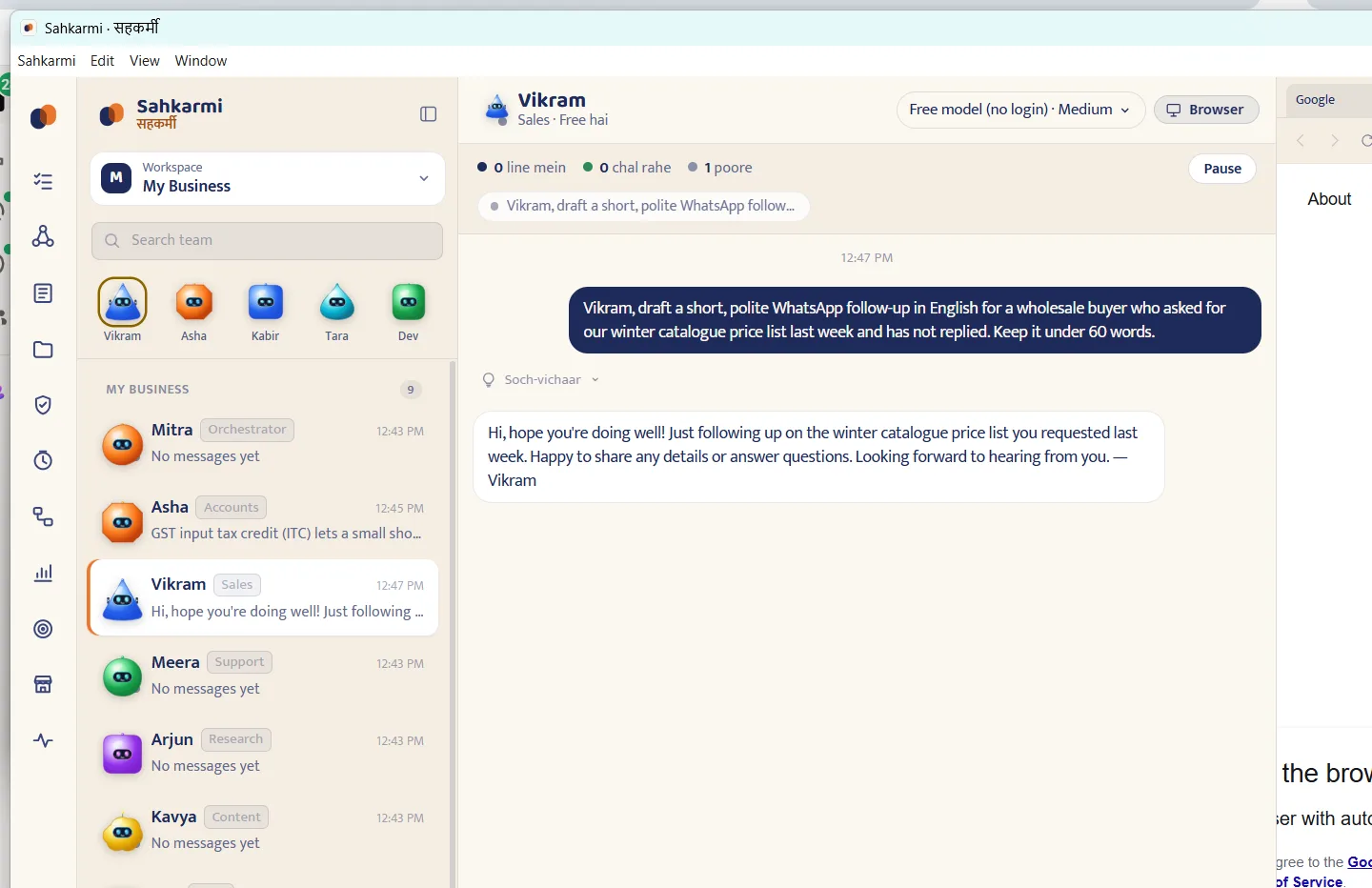
Passwords are typed by you in a secure sheet, not by the AI. The coworker sees that a password was entered, never the password itself.
Working in desktop apps
Since version 0.22.0, coworkers can also use Windows desktop applications, whatever AI provider they run on. With the Control this PC permission they can:
- take a screenshot of a screen and list the open windows,
- start an app, bring a window to the front or close it,
- read a window's buttons, fields and menus through Windows UI Automation, and click one by name,
- click, drag, move the pointer and scroll by position,
- type text and press keys or shortcuts.
Only one coworker uses the desktop at a time, and its chat says when it starts. Typing is refused while a password field has focus, in the Windows sign-in and credential prompts, and inside Sahkarmi itself.
Staying in control
- Permissions you set. Settings, Permissions has a level for each kind of action: ask, allowed, allowed only inside the coworker's folder, or never. Control this PC starts at ask.
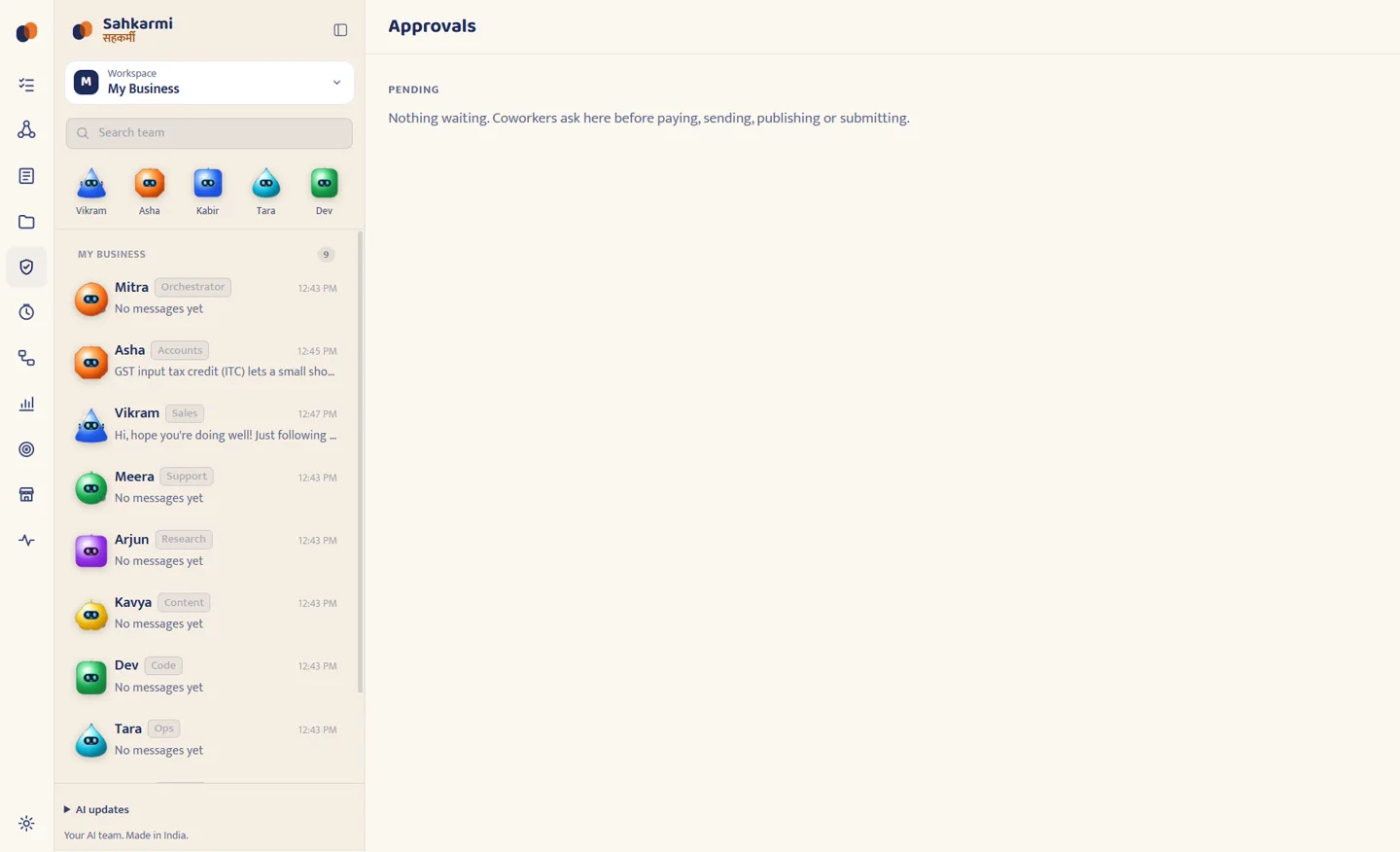
- Approvals before anything that leaves your PC. Posting, sending a message, submitting a form or paying files a card in your Approvals inbox (and in Telegram, if you connect it) in plain words, and the step waits for your answer.
- One approval per task. Saying yes to a post or a form covers the next steps of that same task on that site, so you are not asked again for every click. A new instruction asks again; deleting something, payments and account changes always ask.
- A record. Every permission decision is written to a local audit log you can review.
Example tasks
These are the kinds of multi-step jobs computer use is for. How well each one goes depends on the AI model you connect and on the site or app; see use cases for more, by profession.
Research and summarise
Open a list of competitor websites, collect prices and features into a spreadsheet in the coworker's folder, and write a one-page summary.
Publish a post
Draft a post, open your page in the coworker's browser, attach the image, and post after you approve.
Fill a web form
Take details from a document and fill a registration or application form, stopping for your approval before Submit.
Work in a desktop app
Open a desktop app, read its window, enter data or export a report, and save the result to the shared folder.
Run it every day
Put any of these on a schedule as a routine, for example a 9:00 AM sales summary.
Hand off between coworkers
A research coworker passes findings to a writer coworker, who drafts the report; you see both chats.
Limits, honestly
- Windows only for now. Windows 10 or 11, 64-bit. macOS and Linux builds are paused.
- The AI can make mistakes. Computer-use agents misread pages, click the wrong thing or give up. Approvals exist because of this; read the card before you say yes.
- Your screen and pages go to the AI you choose. To decide the next step, the coworker sends what it sees (page text, window contents or screenshots) to its AI provider. Sahkarmi has no server of its own in between.
- Not benchmarked. Sahkarmi has not been evaluated on computer-use benchmarks such as OSWorld or WindowsAgentArena, so we make no score claims. Results depend mostly on the model you connect.
- Sites can block automation. Some websites limit or forbid automated use in their terms; you are responsible for using coworkers within them.
Questions
Is there a free AI that can use my computer?
Yes. Sahkarmi is free and open source under the Apache 2.0 license, and it includes free AI models through the built-in OpenCode runtime, so you can start without paying for an AI subscription. Paid providers such as Claude or ChatGPT can be connected if you already have them; their own plans and limits apply.
Can it control any desktop app?
It can work with most Windows apps that expose their buttons and fields through Windows UI Automation, and it can fall back to screenshots and clicking by position. Apps that draw their own interface without accessibility information are harder for any agent, and the result depends on the AI model.
Does it run in the cloud?
No. Sahkarmi runs on your PC: the coworkers, their browsers, files and memory are stored on your computer. What a coworker reads is sent to the AI provider you chose so it can decide the next step.
Will it post or pay without asking me?
By default it asks. Posting, sending, submitting and paying each need your approval, and payments and account changes always ask, even within a task you already approved.
How is this different from a browser extension agent?
A Sahkarmi coworker has its own browser profile with its own logins, its own folder and a task queue, can also use desktop apps, can run on a schedule, and several coworkers can work side by side, each one separate.
Sahkarmi is free and open source (Apache 2.0). No account, no card. Windows 10 and 11, 64-bit.
Download free for WindowsSource on GitHub