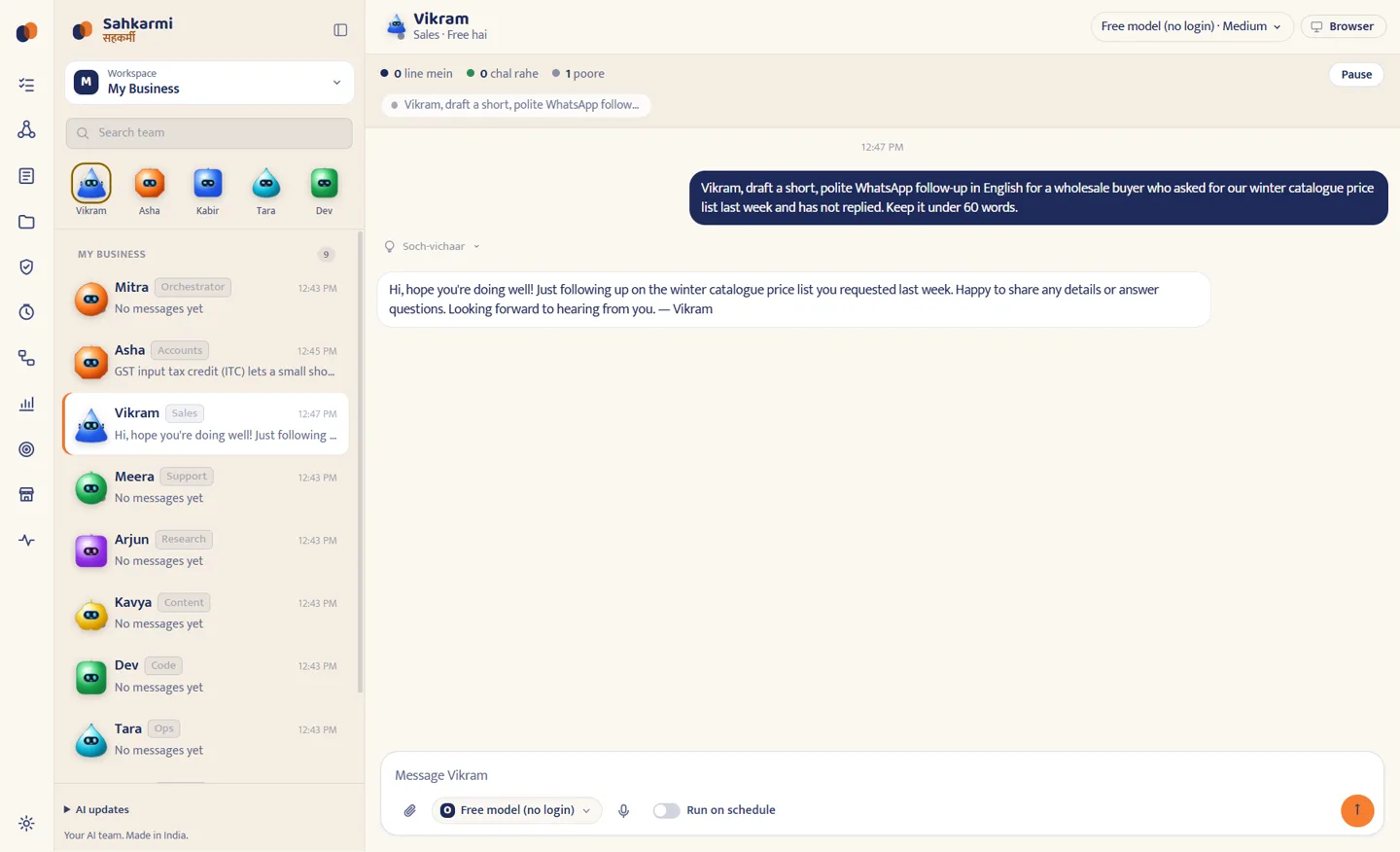
Sahkarmi coworkers carry out multi-step digital work: in websites, in files and, with your permission, in Windows desktop apps. Below are practical workflows by profession, each with the ready-made coworkers that come with the app (175 roles in its marketplace). Every one runs on the AI you connect, and anything that posts, sends, submits or pays waits for your approval.
How well a task goes depends on the AI model and on the site or app involved. These are workflows the app is built for, not guarantees; start with a small task and check the result.
Give a coworker a task in plain words; it works and reports back in the chat.
Finance and accounting
The problem
Month-end means copying numbers between bank statements, invoices, spreadsheets and portals.
Example task
“Match last month's bank statement against the invoices in the Shared folder and list what is unpaid.”
How it helps
The coworker reads the statement and invoices in its folder, builds the reconciliation in a spreadsheet, and lists the gaps. With the browser or desktop permissions it can look values up in your accounting web app or desktop software.
What it uses
Files in the coworker's folder and Shared; its own browser; desktop apps with Control this PC.
Result
A reconciliation spreadsheet and a short list of follow-ups. Payments always wait for your approval.
Posting the same campaign to several pages, checking competitors and reporting results eats the week.
Example task
“Write three posts about the new offer, add the product image, and post them to our Facebook page after I approve.”
How it helps
The coworker drafts the posts, opens your page in its own signed-in browser, attaches the image and stops at Post with an approval card. One approval covers the steps of that post.
What it uses
Its own browser profile, signed in to the accounts you choose; files in Shared.
Result
Published posts (after approval) and a note of what went where.
Finding and qualifying prospects means hours of searching websites and directories and copying details.
Example task
“Find 30 interior design firms in Pune with a website, note their contact page and services, and rank them for our offer.”
How it helps
The coworker searches and opens each site in its browser, collects the details into a spreadsheet, and scores them against your criteria. Sending any outreach message asks you first.
What it uses
Its browser; a spreadsheet in its folder; your CRM in the browser if you sign it in.
Result
A lead list with sources, and draft messages waiting for approval.
Answers are spread over dozens of pages, PDFs and spreadsheets.
Example task
“Compare the pricing pages of these eight tools and summarise the differences in a table.”
How it helps
The coworker visits each source, extracts the facts into a table with links, and writes a summary. Knowledge bases let it search your own documents locally and cite the passage it used.
What it uses
Its browser; files and local knowledge bases.
Result
A sourced table, a spreadsheet or a written report.
Developers want an agent that can read the code, run the tests and check the app in a browser, not only suggest snippets.
Example task
“Reproduce the login bug from issue 42, fix it, and run the tests.”
How it helps
Coding coworkers run on agent CLIs such as Claude Code or Codex inside their own folder, can run commands you allow, and can open the app in a browser to check the result. Shell commands follow your permission settings.
What it uses
The project folder you give it; the terminal (per permission); its browser.
Drafting, editing, translating and formatting documents takes many passes.
Example task
“Turn these meeting notes into a two-page proposal in our usual format, in English and Hindi.”
How it helps
The coworker reads your files, writes the draft in its folder, and can format it in the apps you use. The interface works in English, Hindi and Bengali.
What it uses
Files; desktop apps with Control this PC; its browser for references.
Creative work comes with research, briefs, asset sorting and checking that are not the creative part.
Example task
“Collect reference images and colour palettes for a café brand and write the design brief.”
How it helps
The coworker researches references in its browser, organises files and writes briefs and scripts. It does not replace a designer's judgement; it handles the preparation and checking around it.
What it uses
Its browser; files; desktop apps with Control this PC.
Result
Briefs, reference boards as files, organised asset folders, checklists.
Status updates, trackers and vendor follow-ups repeat every week.
Example task
“Every Monday at 9, collect the status of open tasks and send me a summary on Telegram.”
How it helps
Routines run a coworker on a schedule. It gathers the updates from files, web apps or other coworkers and reports back; anything sent outside asks first.
What it uses
Routines; files; its browser; Telegram if you connect it.
No. You give coworkers tasks in plain words, in English, Hindi or Bengali. The software-development coworkers are for people who do write code.
Which professions is Sahkarmi for?
Anyone whose work happens on a computer: finance, marketing, sales, research, development, writing, design and operations are covered by ready-made coworkers, and you can describe your own role for anything else.
Can several coworkers work at the same time?
Yes. Each coworker has its own chat, folder, browser and task queue, and coworkers can hand work to each other. Only one at a time uses the desktop mouse and keyboard.
Sahkarmi is free and open source (Apache 2.0). No account, no card. Windows 10 and 11, 64-bit.